What is Local SERP Tracking And How To Do It

what-is-local-serp-tracking-how-to-do-it
5
(1)

Local SERP tracking is the process of monitoring how your business appears in location-specific Google search results, including the Local Pack (3-Pack), Google Maps listings, Local Citation Finder, Knowledge Panel results, and organic local rankings. It helps you understand how your visibility changes across different cities, ZIP codes, neighborhoods, and GPS coordinates especially on mobile devices, where location signals are strongest.

In today’s AI Overview powered SERP, tracking local rankings is essential for businesses that depend on local customers, foot traffic, or service-area visibility.

🔎 Why Does Local SERP Tracking Matter?

Google personalizes search results based on:

  • Relevance → how well your business matches the query

  • Distance → how close you are to the searcher

  • Prominence → your authority, positive reviews, citations, high-da backlinks, and online presence

Because of this, the same keyword can produce completely different results depending on:

  • The user’s city, ZIP code, GPS location

  • Whether they use mobile or desktop

  • Search features like Local Pack, Maps, AI Overview, Featured Snippets, and People Also Ask (PAA)

Tracking these variations helps businesses:

  • Understand where they appear in local search results

  • Improve Google Business Profile (GBP) performance

  • Optimize for AI Overviews and SERP features

  • Outperform competitors in specific locations

  • Increase local conversions & foot traffic

Top-ranked competitors like Keyword.com, Nozzle, STAT Search Analytics, BrightLocal, & Whitespark all emphasize the same point:


👉 Local results shift constantly because location intent shifts constantly.

🧭 How Local SERP Tracking Works

How Local SERP Tracking Works 

Local SERP tracking evaluates where your business appears across multiple localized factors:

1. Keywords & Search Intent

Different keyword modifiers signal different intentions:

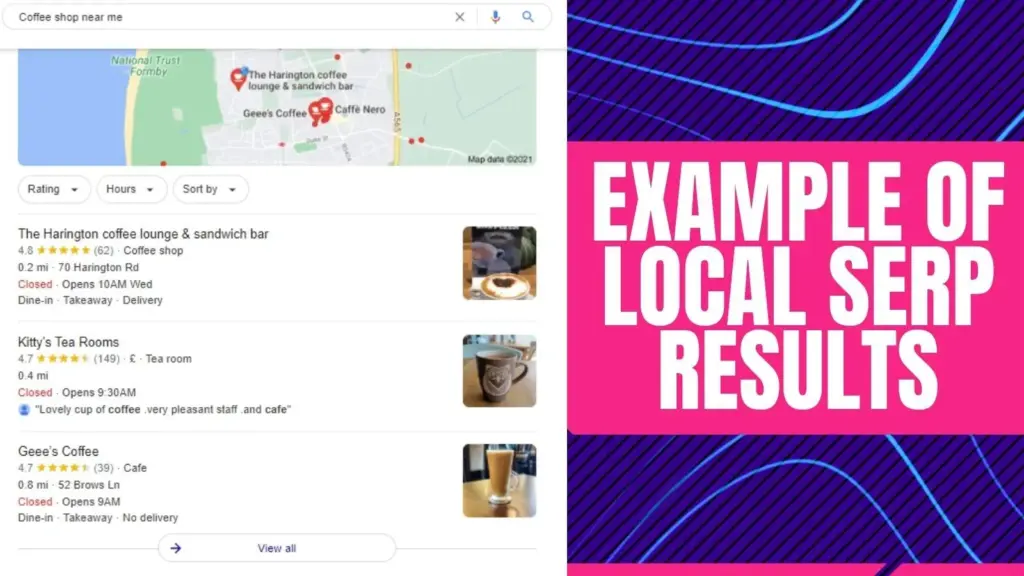
  • “coffee shop near me

  • “cafe in Houston

  • “car wash open now

  • “best salon 77002

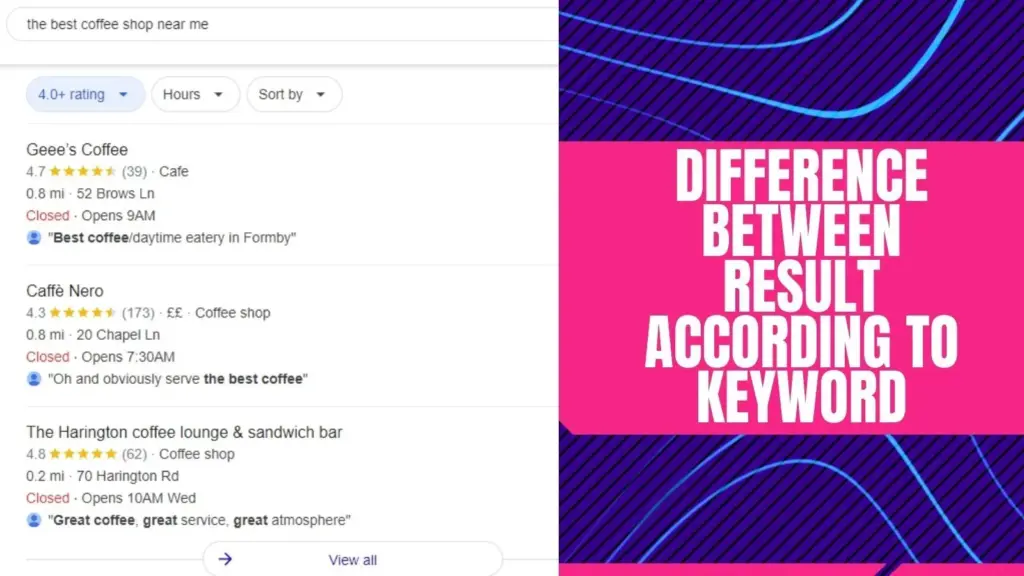
Even if intent is similar, Google generates different SERPs because the entity relationships differ (e.g., coffee shop, café, restaurant).

2. Custom Location Settings (City, ZIP, Coordinates)

Competitor tools like BrightLocal, and GMB Briefcase allow tracking at:

  • City level

  • Neighborhood level

  • ZIP/postal code level

  • Address or GPS coordinate level

  • Country & language

  • Multi-device (mobile + desktop)

Example locale formats (Nozzle-style entities):

  • Google – United States – English – City – Houston, Texas

  • Google – US – English – ZIP – 77002

  • Google – English – GPS – (29.7604° N, 95.3698° W)

This granular tracking helps businesses diagnose true local visibility.

3. Distance & Proximity

Google prioritizes businesses that are:

  • Physically closest to the searcher

  • Most relevant based on intent + proximity

Even a business with lower reviews may appear above a higher-rated competitor if it is significantly closer.

4. Geo-Location Signals (Mobile-First Ranking)

Mobile users trigger:

  • More “near me” SERPs

  • More Google Maps and Map Pack results

  • Higher location precision (via device GPS)

Industries like restaurants, salons, car services, retail, and home services rely heavily on these signals.

5. User Intent (Urgency, Informational, Transactional)

Examples:

Search QueryGoogle InterpretationSERP Type
“ATM near me”Urgent + proximityLocal Pack + Maps
“bookstore near Mumbai bus stand”NavigationalMaps + Local Finder
“house near railway station Mumbai”Transactional + locationMaps + organic local results

Understanding search intent helps businesses appear in AI Overviews, Local Packs, and more.

🛠️ Tools for Local SERP Tracking (with Google Entities)

Below is a competitor-aligned list of entities Google already recognizes. Include them for contextual relevance and AI Overview visibility:

Tool / EntityWhy It Matters
Citation Builder ProLocal citation management + local rank tracking + Google Business Profile (GBP)  Optimization
LLMClicks.aiHelps you understand how your brand appears inside AI search engines like ChatGPT, Google AI, Perplexity, and Bing.
Google Search ConsoleShows keyword impressions and device data.
BrightLocalLocal rank tracking across ZIPs & neighborhoods.
NozzleTracks locales (city, ZIP, GPS, language, search engine).
Keyword.comStrong SERP feature visibility + location modifiers.
WhitesparkLocal citation management + local rank tracking.
Moz LocalLocal listing distribution + GBP monitoring.
SEMrush & AhrefsKeyword tracking + competitive insights.
GMB BriefcasePrecision-based local SERP rank tracking.
  

📍 How To Track Local SERPs (Step-by-Step)

Step 1 – Choose a Local Rank Tracker

Select tools that support ZIP, city, or GPS-based tracking (BrightLocal, Nozzle, Keyword.com, GMB Briefcase).

Step 2 – Define Your Locales

Set each tracking location by:

  • City

  • ZIP Code

  • Neighborhood

  • GPS coordinates

  • Mobile vs desktop

Step 3 – Add Keywords With Local Modifiers

Examples:

  • “coffee shop near me”

  • “electrician in Houston 77002”

  • “car wash Midtown Houston”

Also add intent-based variants: open now, best, top-rated, near bus stand, etc.

Step 4 – Track SERP Features

Measure visibility for:

Step 5 – Monitor Competitors

Track competing listings in:

  • Map Pack

  • GBP profiles

  • Organic results

  • Review sites & citations

  • Forums (Reddit is now a major Google entity due to Google–Reddit partnership)

Step 6 –  Optimize Based on Data

Improve your rankings by:

  • Updating GBP

  • Getting local backlinks

  • Fixing NAP/citations

  • Publishing localized content

  • Improving reviews and responses

This is exactly how leading tools (Citation Builder Pro, Whitespark, BrightLocal) guide users to improve local visibility.
📊 Key Local SERP Ranking Factors

These are the factors AI Overview uses to summarize “what affects local rankings”:

1. Relevance

How well your business matches the query.

2. Distance

How close the searcher is to your business.

3. Prominence

Overall authority based on:

  • Reviews

  • Citations (NAP consistency)

  • Local backlinks

  • Online mentions

  • Behavioral signals (clicks, interactions)

Add Google Business Profile completeness score
Add review velocity & keyword-rich reviews
Add citation accuracy (Citation Builder Pro advantage)

📘 Strategies for Better Local Search Performance

1. Optimize Your Google Business Profile

  • Add categories, services, service areas

  • Add high-quality photos

  • Enable messaging

  • Post weekly updates

  • Respond to all reviews (Google entity: Review)

2. Build Local Citations

Citation Builder Pro’s internal entity strength here is very high.
Ensure consistent NAP across:

  • Yelp

  • Bing Places

  • Apple Business Connect

  • YellowPages

  • Nextdoor

  • Local directories (BrightLocal list entities)

3. Earn Local Backlinks & Press

Local newspapers, blogs, chambers, colleges.

4. Create Localized Content

  • “Best cafés in Houston 77002”

  • “Electrician services near Midtown Houston”

  • “Guide to Google Maps ranking factors”

5. Fix On-Page SEO

Add geo entities:

  • City names

  • Neighborhoods

  • ZIP codes

  • Landmarks

  • Nearby locations

6. Track Competitors & Reverse Engineer

Use SERP data from:

  • Ahrefs

  • SEMrush

  • STAT

  • Nozzle

  • Whitespark

🧩 The Role of AI Overview (AIO) in Local SERP Tracking

Google’s AI Overview now pulls short, factual summaries from:

  • Entities (Google Business Profile)

  • Local Pack data

  • High-authority SEO blogs (Keyword.com, STAT, Nozzle)

  • Structured content with clear definitions

  • FAQ and HowTo schema pages

  • Concise expert statements

To appear in AIO, your content must include:

✔ Clear definitions
✔ Short answers
✔ Structured lists
✔ Verified entities
✔ Schema markup
✔ Internal & external citations
✔ Consistent terminology (GBP, Local Pack, Maps, etc.)

📚 Case Study Example (AIO Loves Quantified Results)

Image showing Case Studies and Real-Life Examples for Local SERP Tracking

Case Study 1: Local Coffee Shop

A local coffee shop used local SERP tracking to improve its search rankings. By optimizing their GMB profile, encouraging customer reviews, and creating localized content, they saw a significant increase in local traffic and sales.

Case Study 2: Bookstore Near a Bus Stand

A bookstore near a bus stand utilized custom location settings and ZIP code targeting to attract customers. By focusing on local keywords and engaging with the community, they improved their local SERP rankings and increased foot traffic.

Case Study 3: Online Beauty and Fitness Store

An online beauty and fitness store struggled to rank in global searches. By shifting their focus to local SERP tracking and creating localized content, they gained visibility in local searches and attracted more customers.

Case Study 4: Local Marketing Agency

A local marketing agency used advanced local SERP tracking strategies to help their clients improve their local search rankings. By conducting regular local SEO audits, leveraging local backlinks, and utilizing email marketing, they achieved significant results for their clients.

Frequently Asked Questions (FAQs)

Q1: What is Local SERP?

Ans: Local SERPs are Google search results tailored to the user’s location, displaying the Local Pack, Google Maps, Local Finder, and relevant nearby businesses.

Q2: How do I track Local SERPs?

Ans: Use local rank trackers to monitor keywords across cities, ZIP codes, GPS coordinates, and devices.

Q3: Why does distance matter?

Ans: Google prioritizes businesses physically closest to the searcher when intent suggests proximity.

Q4: What tools help with local tracking?

Ans: Citation Builder Pro, BrightLocal, Whitespark, Moz Local, and GMB Briefcase.

Q5: What affects Local Pack rankings?

Ans: Relevance, distance, prominence, reviews, citations, and GBP optimization.

Q6: Can online-only businesses skip local tracking?

Ans: Yes unless a specific region generates disproportionate demand.

📍 Want Higher Local Rankings? Start Tracking Like a Pro.

See your true Local Pack, Google Maps & ZIP-level rankings — then fix what’s blocking visibility.

🚀 Start ZIP-Level Tracking — Free Trial

How useful was this post?

Average rating 5 / 5. Votes: 1

No votes so far! Be the first to rate this post.

Related Posts